Corporate video
Filming a public Q&A: how we plan a recorded speaker conversation
How to plan a recorded Q&A, panel or leadership conversation, including the final minutes before going on, audio, camera angles and approvals, drawing on our public Chris Murphy behind-the-scenes clip.
By Tyler Rivera 7 min read
A public Q&A looks simple from the audience. A person sits or stands, questions come in, answers go out. Recording one well is a different matter, especially when the speaker is well known, the schedule is tight and the footage will be seen by people who were not in the room.
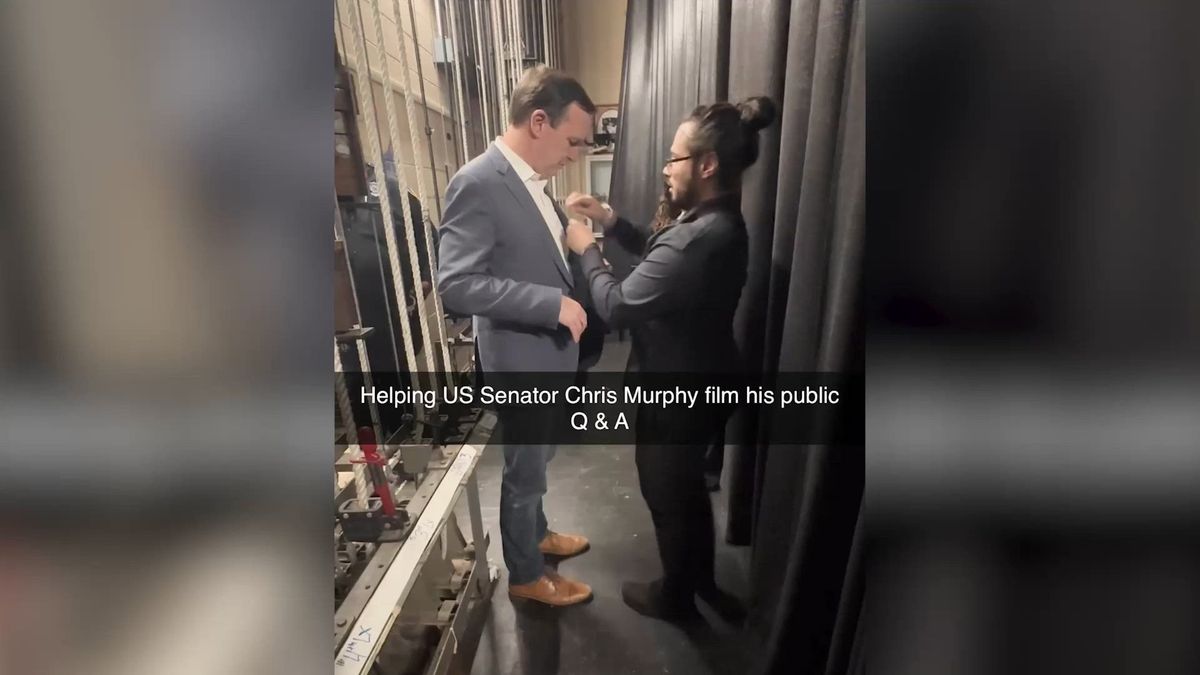
Our public behind-the-scenes clip shows us preparing and filming a public Q&A with U.S. Senator Chris Murphy. In the opening still, a Legend crew member adjusts the Senator's jacket backstage before the Q&A. Below is how we plan a recorded Q&A, panel or leadership conversation, whatever the size of the speaker or the room.
Why the minutes before a Q&A matter
The final minutes before a recorded Q&A bring several important checks together. A microphone is clipped on, the speaker has a quick look at their notes, someone from the host organization wants to confirm the order of events, and a crew member checks how the speaker looks on camera. When those steps are unplanned, they run into each other.
We recommend treating the pre-event window as its own checklist, owned by one person. A reasonable list for any speaker Q&A:
- Confirm who arrives when, and who meets them
- Agree on a private space where the speaker can prepare, even if only briefly
- Check the microphone and any clip, belt pack or handheld unit before the speaker walks in
- Do a quick look at wardrobe on camera, including collar, jacket and anything that may catch light
- Ask the speaker how they like to be cued, and who gives the cue
- Confirm the final run of show with the host, not from memory
A small detail like a jacket collar is far easier to fix backstage than in the edit. These checks are about helping the person feel ready, not about directing them.
Plan the audio before the camera
A recorded Q&A lives or dies on sound. A viewer will tolerate a plain frame, but will not tolerate a speaker they cannot hear or questions from the audience that vanish into the room. What we recommend:
- Decide who is on microphone. The speaker, the moderator and the audience each need a plan, and they are three different problems.
- Ask for a direct feed from the venue's sound system if there is one, and a backup recording from the camera in case the feed drops.
- Place a separate room microphone or recorder to capture reactions and applause, which help the edit feel alive.
- Test the wireless equipment in the actual room, since interference can differ from one space to the next.
- Designate a person who listens on headphones throughout, not only at the start.
Audience questions are the most commonly missed element. If questions come from the floor without a microphone, the recording will have a clear answer to a question nobody can hear. Agree before the event whether audience members will speak into a microphone, whether the moderator will repeat each question, or whether questions will be submitted in advance and read aloud.
Cover the room, not only the speaker
For a conversation, a single camera on the speaker is a start, not a finish. A wider angle helps viewers understand the setting, and a second angle on the moderator or the audience makes the edit easier. Decide what the recording is for, then decide how many angles it needs:
- A simple record for archive or internal review may need one steady wide frame and clean audio.
- A recording that will be cut for a website or social channels benefits from at least two angles and a close shot of the speaker.
- A recording that will be broadcast or shown in a large room needs a more careful plan for lighting and positions.
More angles mean more crew, more setup time and more editing. That is a scope decision, not a quality verdict. A well-recorded single angle with excellent sound is better than three angles with weak audio.
Walk the room before the day
If the venue allows it, visit the room ahead of time, or at least ask for photos and a floor plan. A short visit answers questions a phone call cannot: where the power is, how bright the windows get at the start time, where the sound booth sits and how far the camera positions are from the stage. It also lets you meet the person who will run the room on the day.
On the day itself, arrive early enough to finish setup before the doors open. A crew still running cables while attendees take their seats is a distraction for everyone and a risk for the recording. Leave time for a quick test recording, play it back with headphones, and only then call the setup ready.
Respect the room and the audience
A public Q&A has people in it who did not agree to appear in a video. Ask the host how attendees will be told that recording is taking place, and whether a notice at the entrance or on the invitation is expected. The rules differ between settings, so have that conversation with the host and, where appropriate, their own counsel.
Think too about the camera positions. A tripod in a walkway, cables across an aisle or a lens pointed at one section of the crowd can cause problems for the audience and the venue. A crew that plans its footprint in advance, with a clear route in and out, makes the event safer and keeps the focus where it belongs.
Agree on approvals and uses early
When the speaker is a public figure or the host is an established organization, approvals can be the longest part of the project. Before the event, we recommend agreeing on:
- Who approves the final edit, and whether more than one person must sign off
- How long approvers have to respond
- Which uses are planned: a full recording, short clips for social channels, an internal archive or all of these
- Whether the speaker's team needs to review clips before they are shared
- How the recording will be credited and stored
These questions are not paperwork for its own sake. They affect how many versions the editor makes, how long the project takes and what the quote includes. Our guide to choosing a Connecticut video production company covers how to ask a team about approvals, revisions and usage when you compare proposals.
Turn one recording into more than one asset
A good recording of a Q&A can supply more than a single file. Depending on the plan you agreed, a team might deliver:
- A full-length recording for archive or on-demand viewing
- A shorter edit that keeps the strongest answers
- Short vertical clips for social channels, each built around one question and one answer
- Still photographs of the speaker and the room, if photography was part of the scope
Each of these is separate editing work, and each needs its own approvals. We recommend choosing the two or three most useful versions at the start, not trying to produce every option. Our guide to getting more than one asset from a single corporate shoot shows how to plan this without overloading the project.
What a recorded Q&A means for your budget
Budget for a recorded Q&A is built from familiar parts: preparation, time on site, number of people, equipment, editing and delivery. A few specifics are worth knowing:
- Audio equipment and a person dedicated to audio add cost, but they protect the most important part of the recording.
- Multiple angles add crew and editing time.
- A short rehearsal or site visit adds planning time but reduces risk.
- Quick turnarounds for same-week sharing change how the team schedules the edit.
- Approvals involving several people add review rounds.
Every project is quoted to its own scope. Our overview of videography pricing and our event photography and videography budgeting guide explain how the same factors show up in a proposal.
Questions to ask any team about recording a speaker
If you are comparing teams for a public Q&A or a leadership conversation, these questions are a good start:
- How will you handle audio for the speaker, the moderator and the audience?
- What do you do in the final minutes before the speaker goes on?
- How many angles do you recommend for our goals, and why?
- How do you handle approvals when several people need to review?
- What can you show me from past work, and is it behind-the-scenes footage or a finished piece?
- What do you need from us in the week before?
Common questions
Does the clip show the finished recording?
No. It is behind-the-scenes footage of preparation. The finished recording of any event is agreed as part of that project's scope.
Do you only work with well-known speakers?
No. The same planning applies to a company leader addressing employees, a panel at a conference or a local organization hosting a community conversation. The scale changes, and the questions stay much the same.
Is the Q&A recording the same as a leadership message video?
Not quite. A recorded Q&A captures a live conversation in front of an audience. A leadership message is usually scripted or guided and recorded in a controlled setting. Both are possible, and our leadership message video page explains the second.
Where to go from here
If you are planning a panel, a Q&A or a leadership conversation and want to talk through audio, angles and approvals, our corporate video production page describes how we work, and our conference videography page covers recorded sessions. You can also look through the portfolio for more of our public work.